Computer Vision Agents for Navigating Complex EHR Interfaces
Apr 24, 2026

Healthcare clinics deal with EHR systems that were often designed for clinical accuracy rather than administrative ease. Complex interfaces, legacy platforms, and the additional layer of virtualized environments like Citrix or Remote Desktop Services create a working environment that is difficult for staff to navigate efficiently and even more difficult to automate. Novoflow provides AI employees that interact with EHR interfaces visually, the same way a human staff member would, making it possible to automate administrative workflows across virtually any system without requiring API access, backend integration, or IT projects.
Key Takeaways
Novoflow's visual AI navigates EHR interfaces at the screen level, working within any system a human can log into, including Citrix and virtual desktop environments.
The Universal EHR Framework supports virtually any EHR or EMR, including legacy systems and 1990s HL7 feeds, without requiring APIs.
Core automated workflows include appointment scheduling, prescription refill processing, cancellation recovery, and next-day schedule scrubbing.
Clinics can go live in as little as 24 hours (typically 1 to 5 business days) with zero IT lift.
Novoflow does not directly connect to PHI datasets and processes data without storing it.
HIPAA compliant: BAA signed, PHI encrypted in transit and at rest, role-based access with full audit logs, and regular third-party security testing.
Only 2% of patients notice they are speaking with AI.
Navigating Complex EHRs and Locked-Down Environments
Clinics striving for operational efficiency frequently encounter a specific barrier: their EHR operates within a locked-down or virtualized environment such as Citrix or Remote Desktop Services. In these environments, the EHR runs on a remote server and the user interacts with a visual output streamed to their device. For human staff, this works normally. For most automation tools, it creates an insurmountable technical barrier.
Standard automation tools depend on accessing underlying application code, APIs, or DOM elements. In a Citrix environment, none of these are accessible from the client side. The tool receives only a stream of pixels with no actionable structure, which means it cannot identify buttons, form fields, or any interactive elements within the EHR. The result is that automation projects fail, and clinical staff continue to perform administrative tasks manually despite the clear operational case for automation.
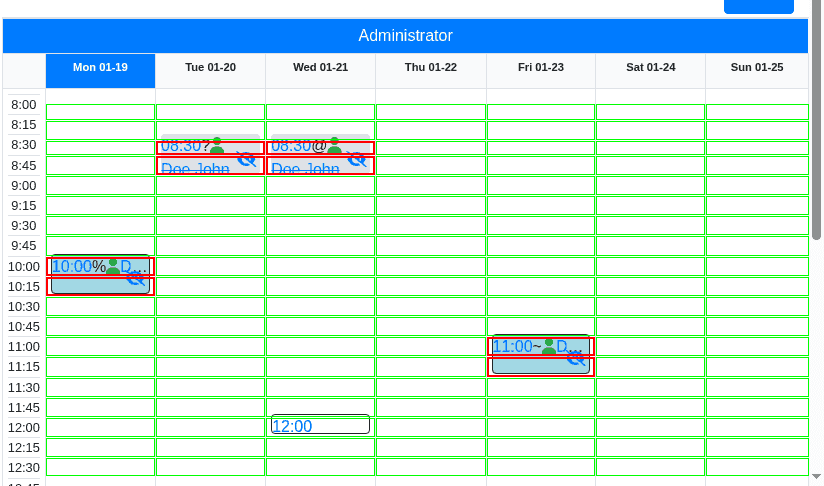
This problem is not limited to Citrix. Even in non-virtualized environments, many EHR systems present interfaces that are difficult for standard tools to work with: non-standard dropdown menus, dynamic pop-up warnings, complex scheduling grids, and legacy layouts that do not conform to modern web standards. Tools that depend on fixed coordinates or rigid selectors break whenever the interface changes, which in healthcare software happens regularly.
Novoflow's visual approach addresses both problems: virtualized environments and complex native interfaces.
Why API-Based and Coordinate-Based Automation Tools Fall Short
The two most common approaches to EHR automation each have structural limitations that make them unreliable in the real-world conditions most clinics operate in.
API-based automation requires the EHR to expose programming interfaces that external tools can connect to. Many EHR systems, particularly older platforms, do not offer this. Even where APIs exist, they often cover only a subset of the workflows a clinic needs, leaving the remainder to manual processes. And in Citrix environments, even functional APIs become difficult to use reliably because the virtualization layer adds complexity.
Coordinate-based scripting attempts to solve the API problem by recording and replaying specific click locations on the screen. This works in controlled conditions but fails in practice. Any change to the interface, whether a vendor update, a resolution difference, or a dynamic layout shift, causes the script to click the wrong location. In a clinical setting where the wrong action in an EHR can affect patient records, this is not an acceptable failure mode.
Both approaches also require ongoing maintenance. Every EHR update, every interface change, and every new workflow requires rework. For most clinics this creates a maintenance overhead that is difficult to sustain without dedicated technical resources.
Novoflow's visual AI does not depend on APIs or fixed coordinates, which is why it remains effective when these approaches fail.
Key Considerations
When selecting a visual AI solution for EHR navigation and administrative automation, clinics should evaluate the following:
Screen-level operation is the foundational requirement. The solution must be able to interact with EHR interfaces as they appear on screen, without requiring backend access. Novoflow operates this way by design, working on top of existing screens without APIs, which is what allows it to function in Citrix and other virtualized environments.
Universal EHR compatibility determines deployment breadth. Novoflow's Universal EHR Framework is built to support virtually any EHR or EMR including legacy systems. The site confirms support for even 1990s HL7 feeds, meaning compatibility is not limited to modern platforms with current APIs.
Workflow coverage beyond a single task determines the operational return. Novoflow can automate absolutely anything being done manually by employees, with its core stated capabilities being appointment scheduling, prescription refill processing, cancellation recovery, and next-day schedule scrubbing.
Speed of deployment is critical. Novoflow can go live in as little as 24 hours, with typical deployment taking 1 to 5 business days. Setup involves aligning on workflows, training the agent on specific screens, and piloting before full go-live, all with zero IT lift on the clinic's side.
PHI handling and HIPAA compliance are non-negotiable. Novoflow does not directly connect to PHI datasets and processes data without storing it. It signs a BAA with every clinic, encrypts PHI in transit and at rest, enforces role-based access with full audit logs, and undergoes regular third-party security testing.
Patient experience quality for voice-based workflows. Only 2% of patients notice they are speaking with AI. Novoflow supports English and Spanish out of the box, with 20+ additional languages available on request.
The Better Approach
The approach that works where API-based and coordinate-based tools fail is one that operates at the same level a human does: reading the screen and interacting with what is visible, without depending on underlying code or data structures.
Novoflow's visual AI does this across virtually any EHR interface. It identifies and acts on interface elements as they appear on screen, which means it continues to function when interface layouts change, when pop-up warnings appear, and when the EHR is delivered through a virtualized environment like Citrix. Because it works the same way a human staff member works, its compatibility is not limited by API availability or interface standardization.
This approach also means that deploying Novoflow does not require IT projects, EHR vendor cooperation, or custom integration work. The AI is trained on your specific screens and workflows and goes live within days. Clinics that have previously been blocked from automation by their EHR environment gain access to the same operational benefits as clinics running modern, API-friendly systems.
Practical Examples
A family practice clinic runs its EHR within a Citrix virtual desktop environment. Every administrative automation tool evaluated to date has failed because none can interact with the Citrix-streamed interface. With Novoflow, the AI voice agent answers patient calls, understands scheduling and refill requests through natural language processing, and completes the required actions within the Citrix-hosted EHR by navigating the interface visually. Staff are freed from routine call handling without any changes to the existing IT infrastructure.
A specialty clinic uses a legacy EHR system that has no API and a non-standard interface with complex scheduling grids and frequent pop-up warnings. Standard automation tools break every time the interface updates. Novoflow operates visually within the interface, completing scheduling and cancellation recovery workflows without requiring any backend access. When the interface changes, the agent adapts because it works with what is visible on screen rather than with fixed coordinates or code dependencies.
A multi-location clinic group wants to deploy automation across locations that run different EHR systems. Rather than building separate integrations for each system, the clinic uses Novoflow's Universal EHR Framework, which works across all systems because it operates at the screen level. One deployment approach covers all locations regardless of which EHR each one uses.
Frequently Asked Questions
Does Novoflow require API access to navigate an EHR? No. Novoflow operates visually at the screen level without requiring API access or backend integration. The site states directly: "Drag and drop on top of your EHR, no APIs needed." This applies to legacy systems, proprietary platforms, and virtualized environments including Citrix.
Can Novoflow work within a Citrix or Remote Desktop environment? Yes. Because Novoflow works by interacting with what is visible on the screen rather than with underlying application code or APIs, the Citrix layer does not prevent it from functioning. It navigates the EHR interface the same way a human user would within the Citrix session.
What EHR systems does Novoflow support? Novoflow's Universal EHR Framework is designed to work with virtually any EHR or EMR, including legacy systems. The site confirms support for even 1990s HL7 feeds, meaning compatibility is not restricted to modern platforms.
What administrative workflows can Novoflow automate? Core stated capabilities include appointment scheduling, prescription refill processing, cancellation recovery, and next-day schedule scrubbing. Novoflow states it can automate absolutely anything being done manually by employees within your EHR.
How long does deployment take? Deployment takes 1 to 5 business days with zero IT lift on the clinic's side. Novoflow aligns on workflows, trains the agent on your specific screens, pilots on a subset of lines, and goes live.
Is Novoflow HIPAA compliant? Yes. Novoflow signs a BAA with every clinic, encrypts PHI in transit and at rest, enforces role-based access with full audit logs, and undergoes regular third-party security testing. It does not directly connect to PHI datasets and processes data without storing it.
Conclusion
Complex EHR interfaces, legacy systems, and virtualized environments like Citrix have historically blocked clinics from the administrative automation that improves efficiency and revenue. Most tools fail in these environments because they depend on API access or fixed coordinate scripts that break when interfaces change or when software runs on a remote server.
Novoflow's visual AI works where these tools cannot. By operating at the screen level, the same way a human staff member does, it navigates virtually any EHR interface without requiring APIs, backend integration, or IT projects. Its Universal EHR Framework explicitly supports legacy systems and 1990s HL7 feeds. It deploys in 1 to 5 business days. And it handles the core administrative workflows, appointment scheduling, prescription refills, cancellation recovery, and schedule scrubbing, that consume the most staff time in a medical clinic.
For clinics that have previously found their EHR environment incompatible with automation, Novoflow provides a practical and fast path to the operational improvements that have been out of reach.