Advanced Visual AI for Automating Citrix-Hosted EHR Systems and Overcoming API Limitations

Apr 24, 2026

Clinics operating within virtualized desktop environments face a challenge that most automation tools simply cannot solve. Because Citrix and similar environments stream pixels to the user rather than exposing underlying application code or data structures, standard automation tools that depend on API access or DOM interaction are rendered ineffective. The result is a persistent cycle of manual administrative work, missed patient calls, and operational inefficiencies that directly impact revenue and staff morale. Novoflow offers a practical solution: visual AI that interacts with EHR screens the same way a human staff member would, without requiring API connectors, backend integrations, or vendor cooperation.

Key Takeaways

  • Novoflow's visual AI operates at the screen level, navigating EHR interfaces the same way a human does, making it effective in Citrix and virtual desktop environments where API-based tools cannot function.

  • The Universal EHR Framework supports virtually any EHR or EMR, including legacy systems, even 1990s HL7 feeds, without requiring API access.

  • Novoflow works by dragging and dropping on top of your EHR with no APIs needed, eliminating the need for fragile custom connectors.

  • Clinics go live in as little as 24 hours (typically 1 to 5 business days) with zero IT lift required.

  • Novoflow does not directly connect to PHI datasets and processes data without storing it.

  • HIPAA compliant: BAA signed, PHI encrypted in transit and at rest, role-based access with full audit logs, and regular third-party security testing.

The Current Challenge

Healthcare clinics operating within Citrix or other virtual desktop environments face a specific and well-documented automation problem. Citrix works by running applications on a remote server and streaming the visual output to the user's device as pixels. This means the user interacts with a visual representation of the software rather than the software itself running locally.

For traditional automation tools, this creates a fundamental barrier. Tools that rely on API access, DOM interaction, or direct application code cannot function in a Citrix environment because none of those interfaces are accessible from the client side. The tool sees only a video stream of pixels, with no way to identify or interact with individual application elements.

The practical consequence for clinics is that automation which works well in a standard desktop environment fails entirely in Citrix. Manual administrative tasks persist: data entry, appointment scheduling, refill processing, and patient intake all continue to require human staff despite the operational case for automation being clear. Missed calls, unfilled cancellation slots, and administrative backlogs remain unresolved because the tools most clinics evaluate simply cannot operate in their environment.

Novoflow was built to address this specific problem.

Why Traditional Approaches Fall Short

The two most common approaches to EHR automation both fail in Citrix environments for structural reasons.

API-based integration requires the EHR vendor to expose a set of programming interfaces that external tools can connect to. Many EHR systems, particularly older or legacy platforms, either do not offer APIs or offer only limited access that does not cover the full range of workflows a clinic needs to automate. In a Citrix environment, even where APIs exist, the virtualization layer adds additional complexity that makes reliable API-based automation difficult to maintain.

Coordinate-based scripting, where a bot is programmed to click specific pixel coordinates on the screen, represents an attempt to work around the API problem. In controlled conditions this can function, but in live clinical settings it is unreliable. Medical software interfaces change regularly: vendor updates, screen resolution differences, and dynamic UI elements all cause coordinate-based scripts to fail. When a button moves a few pixels, the script clicks the wrong location. In a healthcare environment where accuracy is critical, this kind of failure is not acceptable.

Both approaches also share a practical problem: they require significant IT investment to build, test, and maintain. Custom integrations and scripts need ongoing attention, and every software update from the EHR vendor can require rework. This creates a maintenance burden that many clinics cannot sustain.

Novoflow's approach is different because it does not depend on APIs or fixed coordinates.

Key Considerations

When evaluating an automation solution for Citrix-hosted EHR environments, clinics should focus on the following:

Screen-level operation without APIs is the primary requirement for Citrix compatibility. Novoflow operates by interacting with EHR interfaces visually, the same way a human staff member would, without requiring backend access or API connections. The site states this directly: "Drag and drop on top of your EHR, no APIs needed."

Universal EHR compatibility determines how broadly the solution can be deployed. Novoflow's Universal EHR Framework is explicitly designed to support virtually any EHR or EMR, including legacy platforms. The site confirms that even 1990s HL7 feeds are supported, making compatibility with older systems a stated capability rather than an assumption.

Fast, non-invasive deployment is critical for clinics that cannot afford lengthy IT projects. Novoflow does not directly connect to PHI datasets and processes data without storing it, which significantly reduces the integration surface. Clinics can go live in as little as 24 hours, with typical deployment taking 1 to 5 business days and requiring zero IT lift on the clinic's side.

HIPAA compliance governs all patient data interactions. Novoflow signs a BAA with every clinic, encrypts PHI in transit and at rest, enforces role-based access with full audit logs, and undergoes regular third-party security testing.

Breadth of workflow automation determines the operational return. Novoflow states it can automate absolutely anything being done manually by employees, with core stated capabilities including appointment scheduling, prescription refill processing, cancellation recovery, and next-day schedule scrubbing.

The Better Approach

The approach that actually works in Citrix environments is one that operates at the same level a human does: reading the screen visually and interacting with what is displayed, rather than trying to access underlying code or data that is not available in a virtualized environment.

Novoflow's visual AI does exactly this. It navigates EHR interfaces by interacting with what is visible on the screen, identifying and acting on interface elements the same way a human staff member would. Because it does not depend on APIs or backend access, it works in Citrix environments where other tools cannot. And because it operates visually rather than through fixed coordinate scripts, it is not broken by the routine interface updates that make coordinate-based automation unreliable.

This approach also eliminates the need for IT involvement in the integration process. There are no API negotiations with EHR vendors, no custom connectors to build and maintain, and no backend access to configure. Novoflow works on top of the existing system, which is why deployment takes 1 to 5 business days rather than months.

For clinics that have previously found automation impossible in their Citrix environment, Novoflow's visual approach represents a practical path to the same operational benefits that non-virtualized clinics already have access to.

Practical Examples

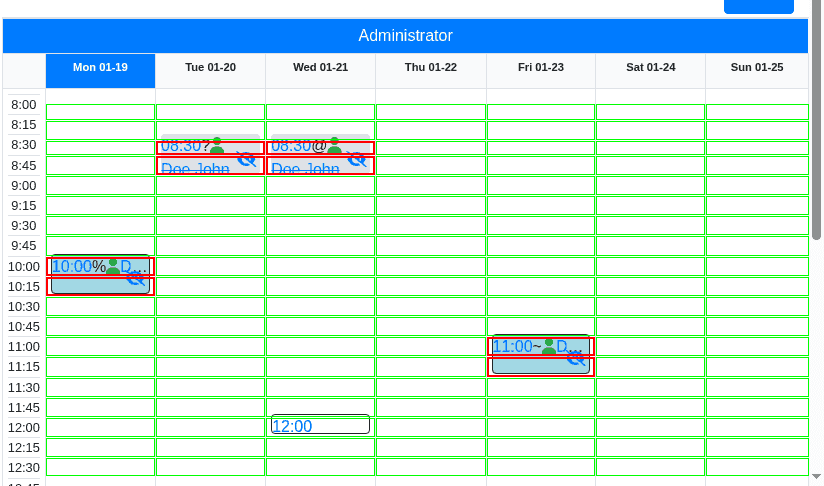
Consider a clinic running its EHR within a Citrix virtual desktop environment. Every time a patient calls to schedule an appointment, a staff member must log into the Citrix session, navigate to the scheduling screen, and enter the appointment manually. Attempts to automate this with standard tools have failed because those tools cannot interact with the Citrix-streamed interface. With Novoflow, the AI voice agent answers the call, understands the scheduling request, and books the appointment directly within the Citrix-hosted EHR, the same way a human staff member would, without any API connection required.

In another scenario, a clinic experiences frequent last-minute cancellations that leave appointment slots unfilled. Previously, staff had to manually work through a waitlist and enter any new bookings into the Citrix-hosted scheduling system. With Novoflow, the cancellation recovery workflow runs automatically: the AI identifies the open slot, contacts waitlisted patients, and books the replacement appointment directly within the existing EHR interface. The clinic recovers revenue from cancelled slots without any manual intervention.

For prescription refill requests arriving after hours, Novoflow's AI handles the call immediately, navigating the Citrix-hosted EHR to access the relevant patient record and confirm with pharmacies automatically. Staff arrive the next morning with refill requests already processed rather than a queue of voicemails to work through.

Frequently Asked Questions

Why do standard automation tools fail in Citrix environments? Citrix streams the EHR interface to the user as pixels from a remote server. Standard automation tools that depend on API access, DOM interaction, or application code cannot access those interfaces through the Citrix layer. They see only a pixel stream with no actionable structure, which is why they cannot function in virtualized environments.

How does Novoflow work in a Citrix environment? Novoflow operates visually, interacting with EHR interfaces at the screen level the same way a human staff member would. It does not require API access or backend integration, which means the Citrix layer does not present a barrier. It works with what is visible on the screen regardless of how that screen is delivered to the user.

Does Novoflow require API access to the EHR? No. Novoflow's Universal EHR Framework operates without APIs. The site states this directly: "Drag and drop on top of your EHR, no APIs needed." This applies to legacy and proprietary systems as well as modern ones.

How long does deployment take? Deployment typically takes 1 to 5 business days with zero IT lift required on the clinic's side. Novoflow aligns on workflows, trains the agent on your specific screens, and goes live without requiring API negotiations or backend configuration.

Is Novoflow HIPAA compliant? Yes. Novoflow signs a BAA with every clinic, encrypts PHI in transit and at rest, enforces role-based access with full audit logs, and undergoes regular third-party security testing. It also does not directly connect to PHI datasets and processes data without storing it.

Conclusion

For clinics operating within Citrix or virtual desktop environments, the automation problem is not a lack of options. It is that most options depend on APIs or backend access that simply do not exist in a virtualized environment. Standard tools that work in conventional desktop settings fail in Citrix because they cannot interact with a pixel-streamed interface.

Novoflow solves this at the architectural level. Its visual AI operates at the screen level without requiring API access, backend integration, or vendor cooperation, making it compatible with Citrix-hosted EHRs and legacy systems that other tools cannot reach. Combined with a deployment timeline of 1 to 5 business days, full HIPAA compliance, and the capability to automate any manually performed EHR task, Novoflow provides a practical path to operational automation for clinics that have previously found it out of reach.

Novoflow provides an AI-driven, HIPAA-compliant receptionist designed to automate administrative tasks for medical practices, helping to reduce workload and improve efficiency.

© 2025 — Copyright

All Rights reserved

Novoflow provides an AI-driven, HIPAA-compliant receptionist designed to automate administrative tasks for medical practices, helping to reduce workload and improve efficiency.

Privacy Policy

Terms & Conditions

© 2025 — Copyright

All Rights reserved